
Breast Cancer (sklearn mode)#
Preview#
In this example, we will solve the Breast Cancer classification problem using our library and Sci-kit Learn.
Setting the experiment#
First, we must import the components we want to use in our experiment.
from time import time
from sklearn.datasets import load_breast_cancer
from sklearn.metrics import accuracy_score
from sklearn.model_selection import train_test_split
from eckity.algorithms.simple_evolution import SimpleEvolution
from eckity.sklearn_compatible.sk_classifier import SKClassifier
from eckity.breeders.simple_breeder import SimpleBreeder
from eckity.creators.gp_creators.ramped_hh import RampedHalfAndHalfCreator
from eckity.genetic_encodings.gp.tree.functions import f_add, f_mul, f_sub, f_div, f_neg, f_sqrt, f_log, f_abs, f_inv, f_max, f_min
from eckity.genetic_encodings.gp.tree.utils import create_terminal_set
from eckity.genetic_operators.crossovers.subtree_crossover import SubtreeCrossover
from eckity.genetic_operators.mutations.subtree_mutation import SubtreeMutation
from eckity.genetic_operators.selections.tournament_selection import TournamentSelection
from eckity.statistics.best_avg_worst_size_tree_statistics import BestAverageWorstSizeTreeStatistics
from eckity.subpopulation import Subpopulation
from eckity.termination_checkers.threshold_from_target_termination_checker import ThresholdFromTargetTerminationChecker

# Adding your own functions
from eckity.sklearn_compatible.classification_evaluator import ClassificationEvaluator
Now we can create our experiment. First, we define the function set and the terminal set. The function set is the set of all possible inner nodes of the tree, and the terminal set is the set of all the leaves in the tree. In addition we will create our dataset using sklearn.
Creating the set of tree nodes#
X, y = load_breast_cancer(return_X_y=True)

    # Automatically generate a terminal set.
    # Since there are 5 features, set terminal_set to: ['x0', 'x1', 'x2', ..., 'x9']
    terminal_set = create_terminal_set(X)

    # Define function set
    function_set = [f_add, f_mul, f_sub, f_div, f_sqrt, f_log, f_abs, f_neg, f_inv, f_max, f_min]
Our tree individuals will contain some common mathematical functions as internal nodes (function set), and the leaves (terminal set) will be the vars x0, x1, …, x9 since we generated them using create_terminal_set(X) on the features vector. We created the dataset using load_breast_cancer from scikit-learn, which you can read more about here.
An example of a possible individual:
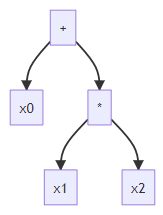
Initializing the evolutionary algorithm#
The Evolution object is the main part of the experiment. It receives the parameters of the experiment and runs the evolutionary process:
algo = SimpleEvolution(
        Subpopulation(creators=RampedHalfAndHalfCreator(init_depth=(2, 4),
                                                        terminal_set=terminal_set,
                                                        function_set=function_set,
                                                        bloat_weight=0.0001),
                      population_size=1000,
                      evaluator=ClassificationEvaluator(),
                      # maximization problem (fitness is accuracy), so higher fitness is better
                      higher_is_better=True,
                      elitism_rate=0.05,
                      # genetic operators sequence to be applied in each generation
                      operators_sequence=[
                          SubtreeCrossover(probability=0.9, arity=2),
                          SubtreeMutation(probability=0.2, arity=1)
                      ],
                      selection_methods=[
                          # (selection method, selection probability) tuple
                          (TournamentSelection(tournament_size=4, higher_is_better=True), 1)
                      ]
                      ),
        breeder=SimpleBreeder(),
        max_workers=1,
        max_generation=1000,
        # optimal fitness is 1, evolution ("training") process will be finished when best fitness <= threshold
        termination_checker=ThresholdFromTargetTerminationChecker(optimal=1, threshold=0.03),
        statistics=BestAverageWorstSizeTreeStatistics()
    )
Let’s break down the parts and understand their meaning.
Initializing Subpopulation#
Sub-population is the object that holds the individuals, and the objects that are responsible for treating them (a Population can include a list of multiple Subpopulations but it is not needed in this case).
Creating individuals#
We have chosen to use ramped-half-and-half trees with init depth of 2 to 4. We set the tree nodes’ sets to be the ones we created before, and we added bloat control in order to limit the tree sizes. We added a bloat penalty to slow tree growth, and we set our population to contain 1000 individuals.
Subpopulation(creators=RampedHalfAndHalfCreator(init_depth=(2, 4),
                                                        terminal_set=terminal_set,
                                                        function_set=function_set,
                                                        bloat_weight=0.0001),
                      population_size=1000,
Evaluating individuals#
Next we set the parameters for evaluating the individuals. We will elaborate on this later on.
              # user-defined fitness evaluation method
              evaluator=ClassificationEvaluator(),
              # maximization problem (fitness is accuracy), so higher fitness is better
              higher_is_better=True,
Breeding process#
Now we will set the (hyper)parameters for the breeding process. We chose an elitism rate that determines what percent of the population’s top individuals will be copied as-is to the next generation in each generation.
Then, we defined genetic operators to be applied in each generation:
Subtree Crossover with a probability of 90%
Subtree Mutation with a probability of 20% (probabilities don’t sum to 1 since operators are simply applied sequentially, in a pipeline manner)
Tournament Selection with a probability of 1 and with tournament size of 4
              elitism_rate=0.05,
              # genetic operators sequence to be applied in each generation
              operators_sequence=[
                  SubtreeCrossover(probability=0.9, arity=2),
                  SubtreeMutation(probability=0.2, arity=1)
              ],
              selection_methods=[
                  # (selection method, selection probability) tuple
                  (TournamentSelection(tournament_size=4, higher_is_better=True), 1)]),
              )
We define our breeder to be the standard simple Breeder (appropriate for the simple case of a single sub-population), and our max number of worker nodes to compute the fitness values is 1.
        breeder=SimpleBreeder(),
        max_workers=1,
Termination condition and statistics#
We define the max number of generations (iterations).
The Algorithm may terminate early upon reaching fitness value such that:
|current fitness - optimal_fitness| <= threshold
        max_generation=1000,
        termination_checker=ThresholdFromTargetTerminationChecker(optimal=1, threshold=0.03),
        statistics=BestAverageWorstSizeTreeStatistics()
    )
Finally, we set our statistics to be the default form of best-average-worst statistics which prints the next format in each generation of the evolutionary run:
generation #(generation number)
subpopulation #(subpopulation number)
best fitness (some fitness which is the best)
worst fitness (some fitness which is average)
average fitness (the average fitness of the individuals)
average size (the average tree size of the individuals)
Sklearn compatibility#
After defining Evolution, we will need to wrap it with a sklearn-compatible classification wrapper,
and split our dataset into train set and test set, using the train_test_split method.
    # wrap the simple evolutionary algorithm with sklearn-compatible classifier
    classifier = SKClassifier(algo)

    # split breast cancer dataset to train and test set
    X_train, X_test, y_train, y_test = train_test_split(X, y, test_size=0.2)
Fitting (Evolution) stage#
When using EC-KitY in sklearn more the evolve method is replaced by the fit method.
Calling fit will set up the sklearn-related properties, and then run the evolutionary algorithm as defined above.
    # fit the model (perform evolution process)
    classifier.fit(X_train, y_train)
Prediction (Execution) stage#
After the fitting (evolution) stage has finished (either by exceeding the maximal number of generations or by reaching a pre-defined threshold), we can perform a prediction (execution) of the fitted (evolved) model.
Note that the algorithm contains a best_of_run_ field.
According to sklearn convention the underscore character at the end of the variable indicates that it represents a state of the fitted model.
We can check the performance of the model by using classifier.predict and computing the accuracy score
between the predicted values and the actual values, using the test set.
    # check training set results
    print(f'\nbest pure fitness over training set: {algo.best_of_run_.get_pure_fitness()}')

    # check test set results by computing the accuracy score between the prediction result and the test set result
    test_score = accuracy_score(y_test, classifier.predict(X_test))
    print(f'test score: {test_score}')
Sklearn-Compatible Classification Evaluator#
The problem defined above is an sklearn mode classification problem, so we will use a specific sklearn-compatible classification evaluator to compute the fitness of the individuals in this experiment.
We keep the X matrix and y vector used in the training phase.
Those parameters can be passed either in the constructor, or using the set_context method.
class ClassificationEvaluator(SimpleIndividualEvaluator):
    """
    Class to compute the fitness of an individual in classification problems.
    """

    def __init__(self, X=None, y=None):
        super().__init__()
        self.X = X
        self.y = y

    def set_context(self, context):
        """
        Receive X and y values and assign them to X and y fields.

        Parameters
        ----------
        context: tuple. first element is a NumPy array of size (n_samples, n_features),
                        and the second element is a NumPy array of size (n_samples, 1) or (n_samples,)
            X matrix and y vector, either (X_train, y_train) or (X_test, y_test), depending on the evolution stage

        Returns
        -------
        None.
        """
        self.X = context[0]
        self.y = context[1]
Evaluating Individuals#
We extend the SimpleIndividualEvaluator, which means we will have to implement the evaluate_individual method.
We measure how close an individual is to the target function by calculating the mean absolute error between
the true class score (y_true=self.y) and the individual score (y_pred = self.classify_individual(individual))).
The classify_individual function executes the individual and classifies into class 1 or class 0 by referring to the CLASSIFICATION_THRESHOLD,
which is 0 in our case.
The individual.execute function runs the tree recursively with the given parameters, which in our example
will return the individual function result.
def evaluate_individual(self, individual):
    y_pred = self.classify_individual(individual)
    return accuracy_score(y_true=self.y, y_pred=y_pred)

def classify_individual(self, individual):
    return np.where(individual.execute(self.X) > CLASSIFICATION_THRESHOLD, 1, 0)